

.jpg)
Web Design Trends 2026 Part 2: 6 Emerging Styles Shaping the Year
Stay updated with web design trends 2026, featuring TL;DR experience, 2.5D design, and more, plus useful implementation tips.



Today, Canva has over 180 million users from various industries and fields, mostly non-designers. It is significant proof that this platform is easy to use, even for those without experience with any design tool. But what tools and features does Canva offer to provide convenience for its users? Let’s learn more about Canva tools together.
Canva offers an array of powerful tools that cater to everyone. It makes it easy to create stunning visuals without needing advanced design skills. Some are the ultimate tools that other platforms or software do not offer. So, what tools must users know and try in Canva?
One of Canva's strengths and advantages is its extensive library of templates. It covers various needs, from social media posts to presentations, resumes, infographics, and more. Using Canva templates is perfect for quick, professional-looking designs. Plus, these templates are customizable and can be edited using Canva. So, it will be easy to maintain a cohesive look across different formats without starting from scratch each time.
Canva’s drag-and-drop interface (link to Canva for Design) is widely praised for its simplicity, flexibility, and accessibility. Its intuitiveness makes it easy to add and rearrange elements like images, text, and shapes. This interface makes other Canva tools more accessible for non-designers, enabling even beginners to create polished designs quickly.
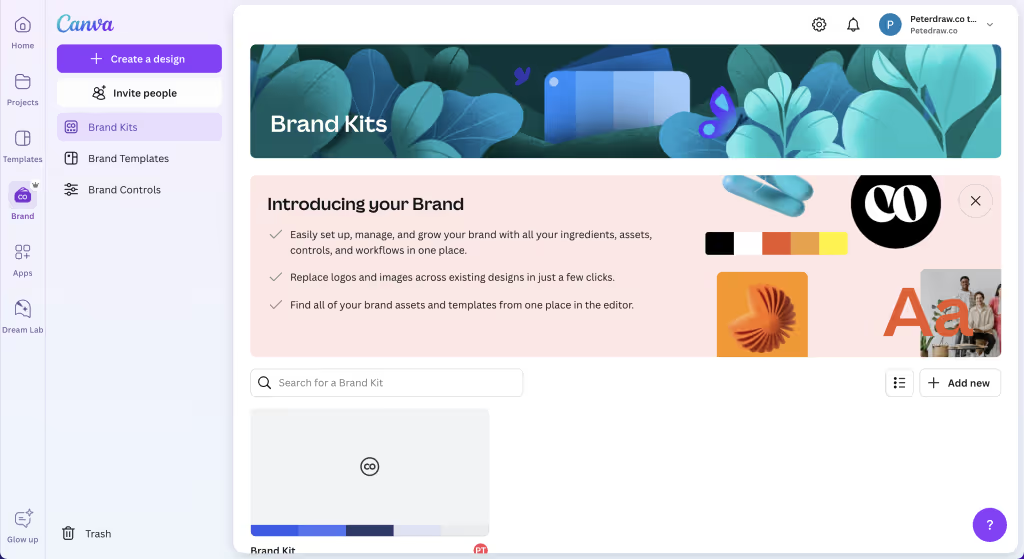
For a better experience in using Canva, the platform offers a Brand Kit tool for Canva Pro users. This tool allows users to upload and store their brand colors, fonts, and logos in one place. Therefore, users can ensure brand consistency across all designs. It is especially useful for businesses and teams that want a unified look, whether a small business or a bigger one.
Another very useful tool from the Pro package is the background remover. The background remover enables users to isolate subjects by removing backgrounds from images with a single click. So, users won’t need intricate methods or complex software to have clean and versatile visuals like the old days.
Canva recently offered collaborative features. The features have been introduced gradually over time, primarily starting with Canva for Teams and Enterprise plans. However, not until 2023 that Canva Doc allowed users to track changes and collaborate on edits in real-time. It marked a significant enhancement in collaborative tools. This feature is ideal for teams and clients who want easy feedback loops and shared creative workspaces.
Canva tools not only help create static designs. It also has animation and video editing tools to create motion designs. Although the editing tools are simple, they can help users create engaging animated graphics and short videos. By utilizing those tools, users can animate text, add transitions, and edit video clips. It is very useful for creating engaging social media and presentations.
Uniform designs for various social media platforms can significantly boost brand recognition and consistency. However, it is quite a challenge to create each from scratch. The magic resize tool from Canva will solve the problem. This tool is a powerful feature that enables users to instantly adjust the dimensions of a design for various platforms. Users only need a few clicks to convert a single design into multiple sizes optimized for different social media platforms or formats.
Canva recently offered collaborative features. The features have been introduced gradually over time, primarily starting with Canva for Teams and Enterprise plans. However, not until 2023 that Canva Doc allowed users to track changes and collaborate on edits in real-time. It marked a significant enhancement in collaborative tools. This feature is ideal for teams and clients who want easy feedback loops and shared creative workspaces.
Canva tools not only help create static designs. It also has animation and video editing tools to create motion designs. Although the editing tools are simple, they can help users create engaging animated graphics and short videos. By utilizing those tools, users can animate text, add transitions, and edit video clips. It is very useful for creating engaging social media and presentations.
Uniform designs for various social media platforms can significantly boost brand recognition and consistency. However, it is quite a challenge to create each from scratch. The magic resize tool from Canva will solve the problem. This tool is a powerful feature that enables users to instantly adjust the dimensions of a design for various platforms. Users only need a few clicks to convert a single design into multiple sizes optimized for different social media platforms or formats.

