

.jpg)
Web Design Trends 2026 Part 2: 6 Emerging Styles Shaping the Year
Stay updated with web design trends 2026, featuring TL;DR experience, 2.5D design, and more, plus useful implementation tips.


Building a fully functional website no longer requires complex coding skills. The rise of no-code platforms has revolutionized web development by allowing users to create professional, responsive websites quickly and efficiently. Among these tools, Webflow website builder stands out for its powerful combination of streamlining the entire web creation process. Let’s dive deeper into what makes Webflow a go-to choice for modern website building.
Webflow is a cloud-based platform that lets users build professional websites without coding. It combines a drag-and-drop visual editor with robust CMS and hosting features, generating clean HTML, CSS, and JavaScript code. This makes it particularly appealing for web designers, developers, freelancers, and businesses seeking professional, scalable websites.
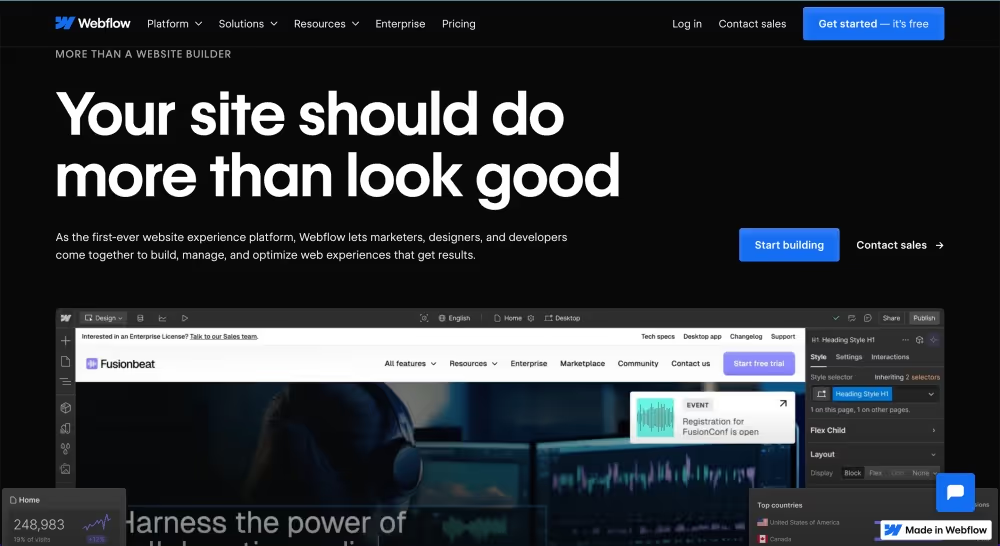
In 2025, Webflow provided more updates to enhance its functionality. Some of its significant updates include AI Site Builder, which allows users to bring their site vision to life in minutes without code, and improved Figma integration for smoother design workflows. Thus, it makes it easier to build and manage websites efficiently.
Beyond its intuitive interface, Webflow website builder is packed with powerful features that cater to both design precision and practical functionality. It’s more than just a visual builder—it’s a platform that combines design, content management, animation, and hosting in one seamless environment. These features work together to give users full creative control while ensuring that performance and scalability aren’t compromised.
Webflow offers a powerful visual design interface that allows users to control every pixel of their site. From layout and typography to colors and animations, users have full visual design control. They can create advanced interactions like parallax scrolling and 3D effects—without writing any code.
Manage dynamic content effortlessly with Webflow’s no-code platform. The flexible CMS lets users build dynamic content like blogs, portfolios, or listings using customizable Collections. Designers and marketers can easily manage and update content using Webflow’s visual editing tools. With API support, they can handle even complex data relationships across dynamic website pages.
Responsiveness is a must in today's design. Webflow website builder ensures sites are fully responsive across all devices. Designers can easily adjust layouts for desktop, tablet, and mobile, while cascading changes simplify the process. Breakpoints are customizable, ensuring a smooth experience no matter the screen size.
Webflow offers e-commerce features to build online stores with customizable product and checkout pages. It supports payment integration through services like Stripe and PayPal for seamless transactions. This feature makes Webflow ideal for digital or boutique products. Even so, it is not yet a replacement for platforms like Shopify at larger scales.
AI tools are integrated into Webflow to help enhance the overall design workflow. The AI Assistant helps rewrite the content and optimize SEO. Meanwhile, the new AI Site Builder generates custom website layouts based on simple user prompts.
Webflow’s hosting is powered by Amazon CloudFront and Fastly for global speed and stability. It ensures 99.9% uptime, fast load times, SSL encryption, and strong DDoS protection. Automatic backups are included to safeguard your website and ensure smooth content recovery. Clean, exportable code enhances SEO performance and removes the need for third-party hosting services.
Webflow website builder supports native integrations with marketing tools, CRMs, analytics, and more. The app marketplace offers over 300 extensions to enhance your Webflow site experience. These tools help streamline building, manage content, and support marketing—all from the dashboard.
SEO tools are a must for any modern website, and Webflow covers this need well. Built-in SEO tools include meta tags, alt text, schema markup, and automatic sitemaps. It also offers marketing features like A/B testing and AI-driven content personalization. Analytics are available through Webflow Analyze, starting with premium plans at just $29 per month.
When comparing no-code platforms, not all tools offer the same level of freedom and performance. Webflow website builder stands out with advanced capabilities beyond basic drag-and-drop editors. From design precision to dynamic content management, here are five things Webflow does better than most no-code website builders.
Unlike many drag-and-drop builders, users get full control over layout, spacing, and responsiveness. Webflow also generates clean HTML, CSS, and JavaScript code behind every visual change you make. It means your designs aren’t limited by pre-made templates or rigid structures.
To develop a fully functional website with engaging user experiences, Webflow lets you create sophisticated animations, hover states, scroll effects, and micro-interactions visually. This level of interactivity is rarely achievable in other no-code tools without custom scripts or plugins.
Webflow’s CMS is one of the most flexible among no-code platforms. Users can create content structures, build dynamic pages from scratch, and reference other CMS items. It makes the Webflow website builder ideal for blogs, portfolios, or directories.
Powered by AWS and Fastly, Webflow’s hosting includes fast loading speeds, free SSL, and automatic backups for added security. This capability outperforms many platforms using shared or third-party hosting. It also offers global CDN coverage and DDoS protection to ensure stable site performance.
Users can quickly turn design concepts into live websites using Webflow’s improved Figma integration and new AI Site Builder. Its AI Assistant can also rewrite content and optimize SEO. Hence, it makes Webflow smarter and more scalable than traditional builders.
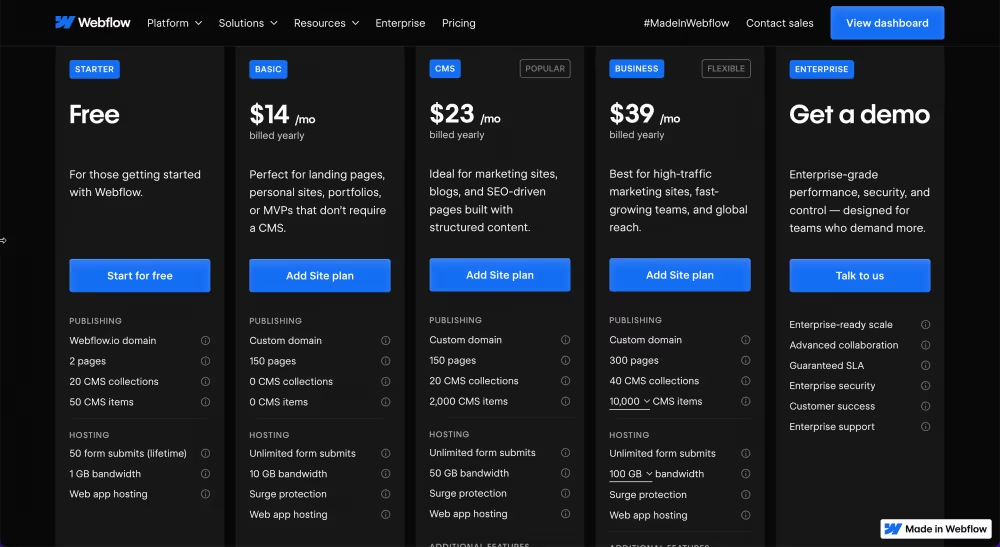
Compared to other no-code website builders, like Framer, Webflow provides more detailed pricing and plan options. Users can choose between Site Plans and Workspace Plans depending on whether they’re building for themselves, clients, or teams. From free starter plans to advanced ecommerce packages, Webflow offers scalable solutions to match various project sizes and budgets.
Ultimately, the Webflow website builder stands out not just for its powerful features but for the flexibility it provides, from design control to pricing. Whether you’re a solo creator, agency, or startup, Webflow gives you the tools to build, manage, and grow professional websites with confidence.
Ready to build your dream site? Try the Webflow website builder today!

